
Public Preview Proxy
The public preview feature generates anonymous subdomain URLs for HTTP services running inside a Sandbox. It requires coordinated configuration across Console, Worker, and Nginx. This guide uses Nginx as an example to walk through the full deployment.
Route registration for public preview is done through Console's HTTP REST API (POST /api/v1/proxy-routes) and is not exposed as an MCP tool. Integrators must implement HTTP calls themselves to create and manage routes; this step cannot be performed through MCP tools.
As the Internet-facing entry point, Nginx can be deployed in multiple instances for HA or horizontal scaling. Ensure DNS load balancing (e.g. multiple A-record round-robin) or a front-end load balancer is in place, and that all Nginx instances can reach every Worker in the allowlist.
Request Sequence
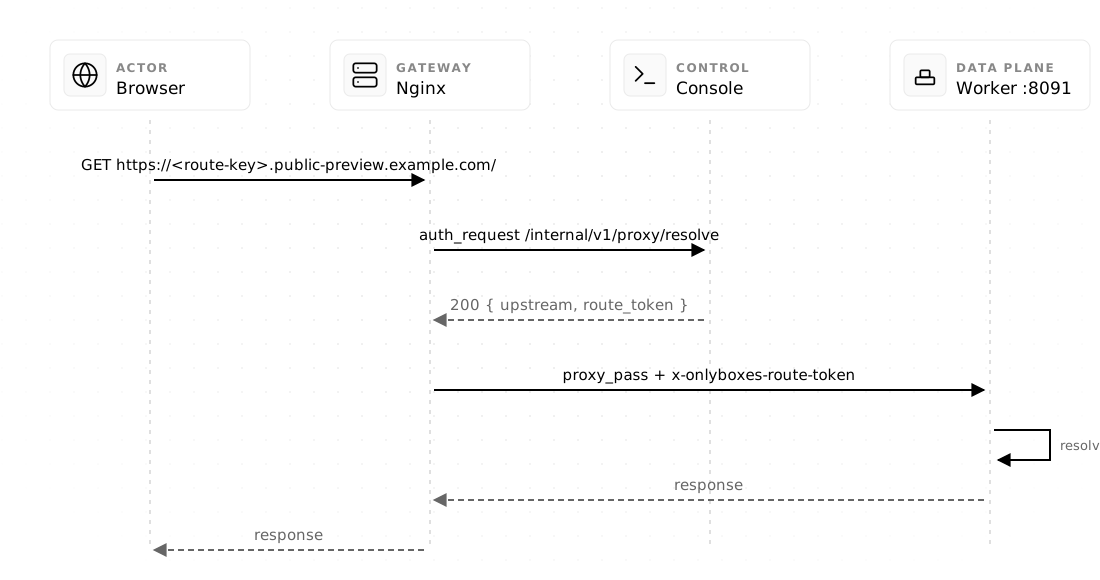
Switch the tabs above to view the request flow for the Docker / Boxlite and E2B data planes respectively. Both share the same prefix:
- The browser requests
https://<route-key>.public-preview.example.com/, reaching Nginx. - Nginx calls Console's
/internal/v1/proxy/resolveinternal endpoint viaauth_requestto resolve the route by route-key. - Console returns the upstream address and Route Token (Docker/Boxlite) or the E2B origin and traffic token (E2B).
Docker / Boxlite: Nginx proxies the request to the Worker proxy port with the Route Token; the Worker resolves the session to the corresponding host mapping port and forwards to the Sandbox. The response returns along the same path.
E2B: Nginx proxies the request directly to the E2B sandbox origin with the traffic token. The response returns along the same path.
Prerequisites
- Wildcard DNS: point
*.public-preview.example.comto Nginx. - Wildcard TLS certificate: issue and deploy a certificate for the same wildcard domain. The wildcard does not cover the base domain itself; previews use a single-level subdomain.
- Nginx
auth_requestmodule available. - Worker proxy ingress is ready and reachable by Nginx.
1. Console Configuration
Generate a random token shared between Nginx and Console:
openssl rand -hex 32Configure Console environment variables:
CONSOLE_PROXY_ENABLED=true
CONSOLE_PROXY_PUBLIC_BASE_DOMAIN=public-preview.example.com
CONSOLE_PROXY_PUBLIC_SCHEME=https
CONSOLE_PROXY_INTERNAL_AUTH_TOKEN=<nginx-console-secret>
CONSOLE_PROXY_ALLOWED_WORKER_CIDRS=0.0.0.0/0,::/0
CONSOLE_PROXY_ALLOWED_WORKER_PORTS=8091
CONSOLE_PROXY_ALLOWED_DIRECT_DOMAINS=e2b.app
CONSOLE_PROXY_ROUTE_TTL_SEC=86400
CONSOLE_PROXY_ROUTE_KEY_LENGTH=26
CONSOLE_PROXY_ROUTE_MAX_PER_ACCOUNT=16
CONSOLE_PROXY_ROUTE_MAX_PER_SESSION=2
The CIDR and port allowlists must contain only Worker ingress endpoints actually reachable by Nginx. See Console Configuration for the remaining environment variables.
2. Worker Configuration
Docker worker
WORKER_PROXY_ENABLED=true
WORKER_PROXY_LISTEN_ADDR=:8091
WORKER_PROXY_ADVERTISE_ADDR=10.20.1.15:8091
# Optional: use a pre-created isolated bridge for terminalExec and pythonExec
# WORKER_DOCKER_NETWORK=onlyboxes-sandbox-custom
The listen and advertise ports must match; the advertise IP must be directly reachable by Nginx and match the Console allowlist. When WORKER_DOCKER_NETWORK is unset, the Worker creates or verifies the onlyboxes-sandbox bridge on startup. When configured, it uses the selected network and attaches both terminalExec and pythonExec containers to it. The network must use the bridge driver with com.docker.network.bridge.enable_icc=false; pre-create it when a specific subnet or gateway is required. The Docker daemon must manage its own iptables/nftables firewall; do not use iptables=false or equivalent configurations that bypass bridge isolation. If the proxy listener fails to start, the Worker does not register with Console.
Boxlite worker
WORKER_PROXY_ENABLED=true
WORKER_PROXY_LISTEN_ADDR=:8091
WORKER_PROXY_ADVERTISE_ADDR=10.20.1.15:8091
WORKER_PROXY_SANDBOX_PORTS=3000,8080
As with the Docker worker, the listen and advertise ports must match and the advertise IP must be directly reachable by Nginx and match the Console allowlist. WORKER_PROXY_SANDBOX_PORTS is a Boxlite-specific setting that declares the guest ports to map when creating VMs.
When each VM is created, the worker binds a random loopback port on the host for every guest port listed in WORKER_PROXY_SANDBOX_PORTS, establishing a guest → host port mapping. When a public preview request arrives at the Worker proxy port, the worker uses the session_id and port from the Route Token to locate the corresponding VM and guest port, then forwards traffic to that VM's host mapping port. Guest ports not listed in WORKER_PROXY_SANDBOX_PORTS do not get a mapping and cannot create public route data-plane connections. An empty WORKER_PROXY_SANDBOX_PORTS causes the worker to refuse to start the proxy.
The proxy listener validation is the same as Docker: port mismatch or non-unicast advertise IP will prevent the worker from registering.
E2B worker
Set WORKER_PROXY_ENABLED=true only. The E2B worker does not listen on a data-plane port; Console resolves the E2B origin through the worker's internal capability, and Nginx then connects to E2B directly. E2B sandboxes reject unauthenticated public traffic; the traffic token is passed only in internal response headers between Console and Nginx.
3. Nginx Configuration
Place the map blocks from docs/nginx/public-preview.conf.example in the http {} block, and the server block in the same http {}. Replace the following placeholders:
| Placeholder | Replace with |
|---|---|
public-preview.example.com | Actual preview base domain |
| Certificate paths | Actual wildcard certificate paths |
127.0.0.1:8089 | Console HTTP address (for auth_request internal call only) |
replace-with-console-proxy-internal-token | Console's CONSOLE_PROXY_INTERNAL_AUTH_TOKEN |
223.5.5.5 1.1.1.1 | Recursive DNS resolver used in the environment |
Validate and reload:
nginx -t
nginx -s reload
Nginx receives the full upstream URL from Console: Docker/Boxlite points to an allowlisted Worker, E2B points to the current sandbox origin. Deployment notes:
- Do not construct
proxy_passfrom client headers; the upstream must come from Console'sauth_requestresponse only. - The example overwrites client-supplied Onlyboxes/E2B internal headers (Route Token, Internal Token, etc.) to prevent forgery, while preserving the Sandbox application's own
Authorizationand cookies as-is. - E2B TLS verification must not be disabled.
4. Test
First create a Session via an authenticated Terminal API and start an HTTP service inside it, then create a route:
curl -sS https://console.example.com/api/v1/proxy-routes \
  -H 'Authorization: Bearer <console-api-key>' \
  -H 'Content-Type: application/json' \
  -d '{"session_id":"<session-id>","port":8080}'
Then access the returned URL without an Onlyboxes cookie or Authorization:
curl -i https://<route-key>.public-preview.example.com/Data-Plane Behavior
| Link | Data plane | Route Token |
|---|---|---|
| Docker / Boxlite | Browser → Nginx → Worker proxy port → Sandbox | A fresh 15-second Route Token is minted per request |
| E2B | Browser → Nginx → E2B sandbox origin | Console returns the current sandbox origin and an internal traffic token |
- Token expiry does not end an accepted HTTP/SSE/WebSocket connection.
- Route access does not renew the Sandbox lease. Long-running previews must renew the terminal session explicitly with
POST /api/v1/sessions/:session_id/renew; renewing the session does not extend the route's own expiry. - Routes are persisted in Console SQLite. Unexpired routes retain their original URLs across a Console restart, but reject new requests until the owning Worker reconnects and the terminal session finishes recovery.
- Access logs and SQLite backups may contain route keys — treat them as credentials and limit retention and read access.